Browsed by
Category: Software Development

CGI programming

CGI programming

I’ve never had an opportunity to work with CGI until now.  CGI is defined on wikipedia this way:


The Common Gateway Interface (CGI) is a standard protocol for interfacing external application software with an information server, commonly a web server.

The task of such an information server is to respond to requests (in the case of web servers, requests from client web browsers) by returning output. Each time a request is received, the server analyzes what the request asks for, and returns the appropriate output. The two simplest ways for the server to do this, are the following:

  • if the request identifies a file stored on disk, return the contents of that file;
  • if the request identifies an executable command and possibly arguments, run the command and return its output

CGI defines a standard way of doing the second. It defines how information about the server and the request is passed to the command in the form of arguments and environment variables, and how the command can pass back extra information about the output (such as the type) in the form of headers.


Here is a great getting started article on CGI.
Methods GET and POST in HTML forms – what’s the difference?

Form Post Tester/Viewer

Link problems with static library

Link problems with static library

An application is generating the following errors:

1>MSVCRTD.lib(MSVCR90D.dll) : error LNK2005: _malloc already defined in libcmtd.lib(dbgmalloc.obj)
1>MSVCRTD.lib(MSVCR90D.dll) : error LNK2005: _free already defined in libcmtd.lib(dbgfree.obj)
1>MSVCRTD.lib(MSVCR90D.dll) : error LNK2005: __endthreadex already defined in libcmtd.lib(threadex.obj)
1>MSVCRTD.lib(MSVCR90D.dll) : error LNK2005: __beginthreadex already defined in libcmtd.lib(threadex.obj)
1>MSVCRTD.lib(MSVCR90D.dll) : error LNK2005: _fprintf already defined in libcmtd.lib(fprintf.obj)
1>LINK : warning LNK4098: defaultlib 'MSVCRTD' conflicts with use of other libs; use /NODEFAULTLIB:library
1>.\Debug/MyApp.exe : fatal error LNK1169: one or more multiply defined symbols found

Q148652 explains the problem and ways to solve it.

I found that I was linking a static library that was compiled with the C/C++…Code Generation…Runtime Library option set to Multi-threaded Debug DLL (/MDd).

My application was using Multi-threaded Debug (/MTd).

The problem went away once I created a version of the static library that was compiled using Multi-threaded Debug (/Mtd) to match the application.

Debugging LoadModule

Debugging LoadModule

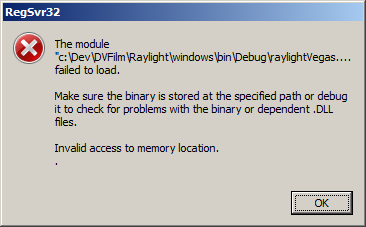
I just finished spending a couple days troubleshooting a problem with a Win32 non-mfc DLL failing a LoadLibrary().  Actually, the post build step for my DLL ran regsvr32 to register it and it started failing with the following message:

Regsvr32Failure

RegSvr32.exe calls the following Win32 functions in this order:

  • OleInitialize
  • LoadLibrary to load the DLL
  • DllRegisterServer or DllUnregisterServer
  • FreeLibrary
  • OleUninitialize

A common reason for failure is that there are dependent DLL's missing.  Dependency Walker is good for checking this.  Unfortunately, this lead me down a rat hole when I saw that there was a complaint about MSVCR90D.dll.  It also led me to erroneously try various things to modify the manifest used and the Code Generation…Library Used settings. 

I was unable to break in the DLLMain of the library so I assumed there was a problem in the way I was building  it.  I even installed the latest Vista SP1 and Visual  Studio SP1 to try to make the "build" problem go away.

Ultimately,  what worked was for me to create a simple program that called LoadLibrary() on my dll.  I then set the  Debug…Exceptions options to catch all  exceptions.  As soon as the test program called  LoadLibrary() (on my debug build) it went right to the  line of  code that was causing an "Invalid access to  memory",  just like the message said!  I guess that's the danger of giving too much information in a message, users will  erroneously choose the wrong symptom.

This worked because the problem  was in some  code that was called during the construction of a C++ object, which was instantiated prior to calling the main entry point of the DLL.

Lesson learned:  When a module fails on startup,  check your global  objects' construction code, and don't forget to turn on catching all exceptions in the debugger!

Working with Windows Driver Kit and Visual Studio 2008

Working with Windows Driver Kit and Visual Studio 2008

I had an occasion to try to build a sample app that talked to an HID (Human Interface Device) USB device.  I downloaded the latest WDK and attempted to build it with VS2008.  I got an error stating that _In_out_ was undefined.  This thread was the most helpful but was not specific enough to help me.  I figured out a fix which I posted to that thread.

I simply renamed the file C:\WinDDK\6001.18001\inc\api\sal.h so that it would not be found, and the version provided by Visual Studio 2008, C:\Program Files\Microsoft Visual Studio 9.0\VC\include\sal.h, gets used.

Link error LNK2005

Link error LNK2005

Was getting this error with some legacy code when converted to VS 2008:

nafxcw.lib(afxmem.obj) : error LNK2005: “void * __cdecl operator new(unsigned int)” (??2@YAPAXI@Z) already defined in LIBCMTD.lib(new.obj)

This article provided a solution.  More  discussion on this issue here.

Overview of C Run-Time and associated options

Based on Visual C++ 6.0:

Solution One: Force Linker to Link Libraries in Correct Order

1. On the Project menu, click Settings.
2. In the Settings For view of the Project Settings dialog box, click to select the project configuration that is getting the link errors.
3. On the Link tab, click to select Input in the Category combo box.
4. In the Ignore libraries box, insert the library names (for example, Nafxcwd.lib;Libcmtd.lib).

Note The linker command-line equivalent in /NOD:<library name>.

5. In the Object/library modules box, insert the library names. You must make sure that these are listed in order and as the first two libraries in the line (for example, Nafxcwd.lib Libcmtd.lib).
This application has failed to start because the application configuration is incorrect

This application has failed to start because the application configuration is incorrect

"This application has failed to start because the application configuration is incorrect"

Was getting this message when testing an application recently converted to VS 2008 from VS 6.0.  Depends showed that MSVCRT80.DLL was a missing dependency.

Here are a few threads on the subject:

On  MSDN Forums

Nikola's Weblog

The  programs was pretty small so I felt the easiest workaround was to link statically to the C runtime library.  I did this by making sure I selected Multi-threaded (/MT) rather than Multi-threaded DLL (/MD) in the C/C++…Code Generation…Runtime Library option.

regsvr32 and Vista

regsvr32 and Vista

Testing the registration of one of our plugins (DLLs) under Vista fails when regsvr32 is launched returning error code 0x80070005.  This is an "Access Denied" error and has to do with the fact that under Vista, if you run regsvr32 from a command prompt, the command prompt must be started in Admin Mode (elevated).

What does regsvr32 do?

Programatically registering a dll.

Not only would executing a shell command to launch regsvr32 fail, but updating ther registery also gets a AccessDenied error.  I ended up just turning off UAC while I tested.  I suppose since our setup program accessed permission, once given, everything else worked.

How to save money running a startup, or not.

How to save money running a startup, or not.

List of practical tips for saving money in a startup.  Comments on the post are worth reading.  Go HERE for counterpoints.  Perhaps working long hours isn't all life should be about.

  1. Buy Macintosh computers, save money on an IT department

  2. Buy second monitors for everyone, they will save at least 30 minutes a day, which is 100 hours a year… which is at least $2,000 a year…. which is $6,000 over three years. A second monitor cost $300-500 depending on which one you get. That means you're getting 10-20x return on your investment… and you've got a happy team member.

  3. Buy everyone lunch four days a week and establish a no-meetings policy. Going out for food or ording in takes at least 20-60 minutes more than walking up to the buffet and eating. If you do meetings over lunch you also save that time. So, 30 minutes a day across say four days a week is two hours a week… which is 100 hours a year. You get the idea.

  4. Buy cheap tables and expensive chairs. Tables are a complete rip off. We buy stainless steel restaurant tables that are $100 and $600 Areon chairs. Total cost per workstation? $700. Compare that to buying a $500-$1,500 cube/designer workstation. The chair is the only thing that matters… invest in it.

  5. Don't buy a phone system. No one will use it. No one at Mahalo has a desk phone except the admin folks. Everyone else is on IRC, chat, and their cell phone. Everyone has a cell phone, folks would rather get calls on it, and 99% of communication is NOT on the phone. Savings? At least $500 a year per person… 50 people over three years? $75-100k

  6. Rent out your extra space. Many folks have extra space in their office. If you rent 5-10 desks for $500 each you can cut your burn $2,500 to $5,000 a month, or $30-60,000 a year. That's big money.

  7. Outsource accounting and HR—such a no brainer.

  8. Don't buy everyone Microsoft Office–it's too much money. Put Office on three or four common computers and use Google Docs.

  9. Use Google hosted email. $50 or free per user…. how can you beat that?!?! Why screw with an exchange server!?!?

  10. Buy your hardest working folks computers for home. If you have folks who are willing to work an extra hour a day a week you should get them a computer for home. Once you get to three hours of work a week from home you're at 150 hours a year and that's a no brainer. Invest in equipment *if* the person is a workaholic.

  11. Fire people who are not workaholics. don't love their work… come on folks, this is startup life, it's not a game. don't work at a startup if you're not into it–go work at the post office or stabucks if you're not into it you want balance in your life. For realz.

  12. Get an expensive, automatic espresso machine at the office. Going to starbucks twice a day cost $4 each time, but more importantly it costs 20 minutes. Buy a $3-5,000 Jura industrial, get the good beans, and supply the coffee room with soy, low fat, etc. 50 people making one trip a day is 20 hours of wasted time for the company, and $150 in coffee costs for the employees. Makes no sense.

  13. Stock the fridge with sodas—same drill as above.

  14. Allow folks to work off hours. Commuting sucks and is a waste of time for everyone. Let folks start at 6am or 11am and you'll cut their commute in half (at least in LA).

  15. Go to each of your vendors every 6-9 months and ask for 10-30% off. If half of them say yes you'll save 5-15% on fixed costs. People will give you a discount if they think they are going to lose the business.

  16. Don't waste money on recruiters. Get inside of linkedin and Facebook and start looking for people–it works better anyway.

  17. Really think about if you need that $15,000 a month PR firm. Perhaps you can get a PR consultant to work on 2-3 projects a year for $10-15k each and save 75%. More PR firms are wasted half the year while you build up your product anyway.

  18. Outsource to middle America: There are tons of brilliant people living between San Francisco, Los Angeles, and New York who don't live in a $4,000 one bedroom apartment and pay $8 to dry clean a shirt–hire them!

Anyone else have startup money saving tips? I will post them below as they come in…

  1. Peter Rojas of RCRDLBL: You probably don't need to rent an office, at least not at first. It's really easy to collaborate online, and unless you have a really compelling reason for everyone being in the same place at the same time, you should save your money for as long as you can get away with it. Plus it'll force you to hire people who don't need to be micromanaged.

  2. Pat Phelan gives a ton of advice including: a) No company cars, b) put your HQ in the burbs to save 50% on rent, c) Blog instead of hiring a PR firm, d) let one person book flights since it's an art, e) keep conference calls to a minimum (amen to that!).