Advice Columns
Who is your favorite advice columnist?
I like Carolyn Hax who appears in the Austin American Statement. She is quick witted, no nonsense and thought provoking. I feel her columns tend to be long winded however, as if she is trying to fill space.
Easily, my favorite who stands head and shoulders above all others is Slate's Dear Prudence. The author hasn't always been the same but the questions have always been interesting and the answers funny and right on target. I have it delivered to my inbox.
Programming a Universal Remote

I have an inexpensive RCA universal remote we use with an old Magnavox TV. It stopped working for some reason so I needed to try reprogramming it. Searching on the Internet I found this advice:
- Remove the battery cover on the back of the remote and look for the model number ("RCR6124609P" for instance)
- Consult list of TV codes for your model via: search online
Sure enough, on the back of the battery cover I found the code RCR311B. Searching online I found these instructions which worked for the remote:
1. Manually turn on the TV
2. Press and hold the TV button The illuminated ON•OFF key turns on and remains on.
3. While holding the component key down, press and hold the ON•OFF key. The illuminated ON•OFF key turns off.
4. After holding down both keys for three seconds, the illuminated ON•OFF key turns back on.
5. Release both keys. The illuminated ON•OFF key remains on. TIP:
Throughout the programming of each key, be sure to keep the remote
pointed at the IR sensor of the component you are currently programming
the remote to control.
6. Press and release the ON•OFF key
repeatedly until your component turns off. Each time you press the
ON•OFF key, the illuminated ON•OFF key blinks, and the next
code
in the list is sent. This process continues until all of the codes in
the Code Lists have been searched. If your component turns off, you
have found the correct code.
TIP: Because there are so many codes, you may have to press the ON•OFF key many times-possibly up to 200 times.
7. Once you have found the correct code, you must save the new code by
pressing and releasing the STOP key. The illuminated ON•OFF key turns
off. You must press the STOP key to save the code or the correct code
will not be stored!
8. To confirm that the component key is
programmed with the correct code for maximum functionality, test the
component. Attempt to control a variety of the component's functions
with the remote. If some of the features of your components do not
work, try programming the remote with a different code in the list
until you find the code that allows the remote to control the majority
of your component's functions. Different codes can provide different
levels of functionality.
Link problems with static library
An application is generating the following errors:
1>MSVCRTD.lib(MSVCR90D.dll) : error LNK2005: _malloc already defined in libcmtd.lib(dbgmalloc.obj)
1>MSVCRTD.lib(MSVCR90D.dll) : error LNK2005: _free already defined in libcmtd.lib(dbgfree.obj)
1>MSVCRTD.lib(MSVCR90D.dll) : error LNK2005: __endthreadex already defined in libcmtd.lib(threadex.obj)
1>MSVCRTD.lib(MSVCR90D.dll) : error LNK2005: __beginthreadex already defined in libcmtd.lib(threadex.obj)
1>MSVCRTD.lib(MSVCR90D.dll) : error LNK2005: _fprintf already defined in libcmtd.lib(fprintf.obj)
1>LINK : warning LNK4098: defaultlib 'MSVCRTD' conflicts with use of other libs; use /NODEFAULTLIB:library
1>.\Debug/MyApp.exe : fatal error LNK1169: one or more multiply defined symbols found
Q148652 explains the problem and ways to solve it.
I found that I was linking a static library that was compiled with the C/C++…Code Generation…Runtime Library option set to Multi-threaded Debug DLL (/MDd).
My application was using Multi-threaded Debug (/MTd).
The problem went away once I created a version of the static library that was compiled using Multi-threaded Debug (/Mtd) to match the application.
Adding items to the Send To context menu
Right-drag the application icon or application shortcut icon from the start menu to your desktop and choose "Create shortcut here" from the menu that displays when you release the right mouse button. Rename the shortcut as appropriate.
In Vista, paste the following into a Windows Explorer addressbar:
%APPDATA%\Microsoft\Windows\SendTo
Move the shortcut you recreated to the SendTo folder you just opened up.
How to enjoy Home Videos
I recently cut up and edited 3 1/2 hours of video shot in 2000-2001. This includes Kristen’s birth and some of the cutest footage of the kids when they were young.
My goal was to create small clips that can be viewed one at a time or in a playlist. This has the best chance of friend and family being interested in watching. So much of what ends up at home is LONG footage where only a fraction is actually viewable outside of the immediate family.
My second goal was for the final files to be viewable on Windows, Mac, and an XBOX. I would like to able to browse and play video in our Living room on our HDTV which has an XBOX hooked up to it.
I”m struggling to find just the right settings/format/codec to use that will result in good quality and not take up tons of space. I had captured the original footage from tape using a USB capture device and software which created a 7Gig MPEG-PS file. For now, I am exporting to MPEG2 which appears to be the best balance of quality size and compatibilty. However my XBOX360 can’t stream MPEG2 for some reason so I’ve also been exporting to MPEG4. This streams on my XBOX but is highly compressed and not very good quality
I use Sony Vegas to cut up and create individual clips. I export to MainConcept MPEG-2.
Jeff describes his setup to playback Blu-ray from his HD.
Converting video for your video iPod
Debugging LoadModule
I just finished spending a couple days troubleshooting a problem with a Win32 non-mfc DLL failing a LoadLibrary(). Actually, the post build step for my DLL ran regsvr32 to register it and it started failing with the following message:
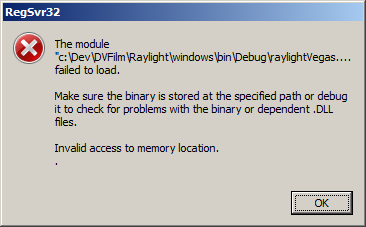
RegSvr32.exe calls the following Win32 functions in this order:
- OleInitialize
- LoadLibrary to load the DLL
- DllRegisterServer or DllUnregisterServer
- FreeLibrary
- OleUninitialize
A common reason for failure is that there are dependent DLL's missing. Dependency Walker is good for checking this. Unfortunately, this lead me down a rat hole when I saw that there was a complaint about MSVCR90D.dll. It also led me to erroneously try various things to modify the manifest used and the Code Generation…Library Used settings.
I was unable to break in the DLLMain of the library so I assumed there was a problem in the way I was building it. I even installed the latest Vista SP1 and Visual Studio SP1 to try to make the "build" problem go away.
Ultimately, what worked was for me to create a simple program that called LoadLibrary() on my dll. I then set the Debug…Exceptions options to catch all exceptions. As soon as the test program called LoadLibrary() (on my debug build) it went right to the line of code that was causing an "Invalid access to memory", just like the message said! I guess that's the danger of giving too much information in a message, users will erroneously choose the wrong symptom.
This worked because the problem was in some code that was called during the construction of a C++ object, which was instantiated prior to calling the main entry point of the DLL.
Lesson learned: When a module fails on startup, check your global objects' construction code, and don't forget to turn on catching all exceptions in the debugger!
Implementing right-click context menu in Cocoa as a function call
I was porting some Windows code to Cocoa that used a synchronous call to TrackMenuPopup (TPM_RETURNCMD | TPM_NONOTIFY) to display a context menu and immediately return the menu item selected. I didn't want the menu to post a notification because that would require a more complicated architecture that could port between Mac and Windows. I posted the question titled "Is there an equivalent technique in Cocoa for the synchronous TrackPopupMenu in Windows?" to stackoverflow.com.
I couldn't decouple the NSMenu notification to an NSView so I came up with a solution using a dummy NSView. This way I could implement a popup menu as a function call that returns the selected value. Apparently popUpContextMenu is synchronous:
I ultimately came up with the following solution:
// Dummy View class used to receive Menu Events
@interface DVFBaseView : NSView
{
NSMenuItem* nsMenuItem;
}
– (void) OnMenuSelection:(id)sender;
– (NSMenuItem*)MenuItem;
@end
@implementation DVFBaseView
– (NSMenuItem*)MenuItem
{
return nsMenuItem;
}
– (void)OnMenuSelection:(id)sender
{
nsMenuItem = sender;
}
@end
// Calling Code:
void HandleRButtonDown (NSPoint pt)
{
NSRect graphicsRect; // contains an origin, width, height
graphicsRect = NSMakeRect(200, 200, 50, 100);
//—————————–
// Create Menu and Dummy View
//—————————–
nsMenu = [[[NSMenu alloc] initWithTitle:@"Contextual Menu"] autorelease];
nsView = [[[DVFBaseView alloc] initWithFrame:graphicsRect] autorelease];
NSMenuItem* item = [nsMenu addItemWithTitle:@"Menu Item# 1" action:@selector(OnMenuSelection:) keyEquivalent:@""];
[item setTag:ID_FIRST];
item = [nsMenu addItemWithTitle:@"Menu Item #2" action:@selector(OnMenuSelection:) keyEquivalent:@""];
[item setTag:ID_SECOND];
//———————————————————————————————
// Providing a valid windowNumber is key in getting the Menu to display in the proper location
//———————————————————————————————
int windowNumber = [(NSWindow*)myWindow windowNumber];
NSRect frame = [(NSWindow*)myWindow frame];
NSPoint wp = {pt.x, frame.size.height – pt.y}; // Origin in lower left
NSEvent* event = [NSEvent otherEventWithType:NSApplicationDefined
location:wp
modifierFlags:NSApplicationDefined
timestamp: (NSTimeInterval) 0
windowNumber: windowNumber
context: [NSGraphicsContext currentContext]
subtype:0
data1: 0

0; data2: 0];
[NSMenu popUpContextMenu:nsMenu withEvent:event forView:nsView];
NSMenuItem* MenuItem = [nsView MenuItem];
switch ([MenuItem tag])
{
case ID_FIRST: HandleFirstCommand(); break;
case ID_SECOND: HandleSecondCommand(); break;
}
}
@interface DVFBaseView : NSView
{
NSMenuItem* nsMenuItem;
}
– (void) OnMenuSelection:(id)sender;
– (NSMenuItem*)MenuItem;
@end
@implementation DVFBaseView
– (NSMenuItem*)MenuItem
{
return nsMenuItem;
}
– (void)OnMenuSelection:(id)sender
{
nsMenuItem = sender;
}
@end
// Calling Code:
void HandleRButtonDown (NSPoint pt)
{
NSRect graphicsRect; // contains an origin, width, height
graphicsRect = NSMakeRect(200, 200, 50, 100);
//—————————–
// Create Menu and Dummy View
//—————————–
nsMenu = [[[NSMenu alloc] initWithTitle:@"Contextual Menu"] autorelease];
nsView = [[[DVFBaseView alloc] initWithFrame:graphicsRect] autorelease];
NSMenuItem* item = [nsMenu addItemWithTitle:@"Menu Item# 1" action:@selector(OnMenuSelection:) keyEquivalent:@""];
[item setTag:ID_FIRST];
item = [nsMenu addItemWithTitle:@"Menu Item #2" action:@selector(OnMenuSelection:) keyEquivalent:@""];
[item setTag:ID_SECOND];
//———————————————————————————————
// Providing a valid windowNumber is key in getting the Menu to display in the proper location
//———————————————————————————————
int windowNumber = [(NSWindow*)myWindow windowNumber];
NSRect frame = [(NSWindow*)myWindow frame];
NSPoint wp = {pt.x, frame.size.height – pt.y}; // Origin in lower left
NSEvent* event = [NSEvent otherEventWithType:NSApplicationDefined
location:wp
modifierFlags:NSApplicationDefined
timestamp: (NSTimeInterval) 0
windowNumber: windowNumber
context: [NSGraphicsContext currentContext]
subtype:0
data1: 0

0; data2: 0];
[NSMenu popUpContextMenu:nsMenu withEvent:event forView:nsView];
NSMenuItem* MenuItem = [nsView MenuItem];
switch ([MenuItem tag])
{
case ID_FIRST: HandleFirstCommand(); break;
case ID_SECOND: HandleSecondCommand(); break;
}
}
Connecting to Mac File Sharing from Vista PC
I've been befuddled by Vista, unable to connect to my MacBook Pro from my Vista laptop. I could always connect from the MacBook to my Vista laptop, though. Connection issues has been a source of pain for me ever since I started using Vista.
I searched and came across this tip that solved all my problems! Thanks Matt!
- “Click Windows Visa Start Orb
- In search box, type “regedit” and return
- Once regedit opens, click File -> export to make a backup copy
- Navigate to Computer HKEYLOCALMACHINE SYSTEM CurrentControlSet Control Lsa.
- In the right pane, right-click the “LmCompatibilityLevel” key and select “modify”
- Change the value from 3 to 1
- Exit regedit and you should now be able to properly authenticate to your Mac OS X (or other Samba) share.”
Avid recommends DVFilm MXFX for format conversion
Avid, one of the biggest players in professional video editing, links to our MXFX product in their P2 White Paper. It’s at the bottom of page 2.